> ## Documentation Index
> Fetch the complete documentation index at: https://docs.aupaircal.com/llms.txt
> Use this file to discover all available pages before exploring further.
# Name your household and choose its timezone
> Set the shared name and timezone for your family calendar.
1. On the welcome screen, choose **Get Started**.
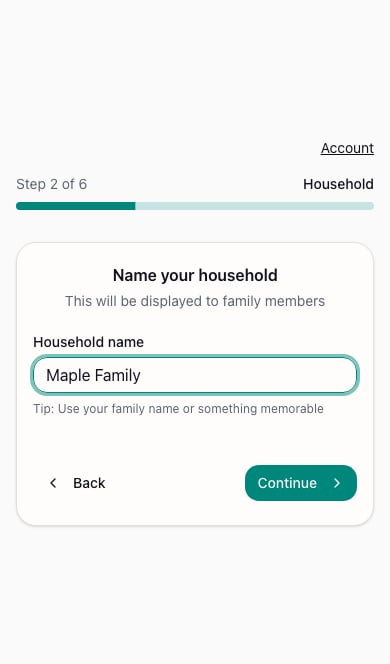
2. Enter a **Household name** that your family will recognize, then choose **Continue**.
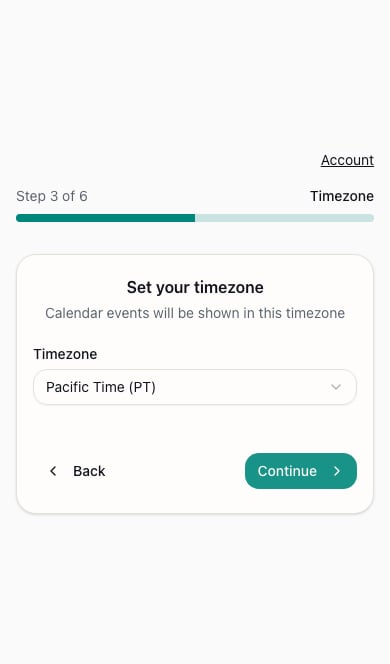
3. Review the **Timezone** selection. Choose the timezone your household uses and continue.
4. At **Invite Family**, add your partner or au pair, or skip and invite them later.
5. Choose a [schedule template](/setup/templates) or skip it.
6. At the completion screen, choose **Continue to Dashboard** and [activate your subscription](/setup/subscription) if prompted.
 Everyone shares the same household calendar. Check the timezone before adding shifts, especially if someone is traveling.
**Next:** [Choose a schedule template](/setup/templates).
This documentation is built and hosted on [Mintlify](https://mintlify.com), a developer documentation platform.
Everyone shares the same household calendar. Check the timezone before adding shifts, especially if someone is traveling.
**Next:** [Choose a schedule template](/setup/templates).
This documentation is built and hosted on [Mintlify](https://mintlify.com), a developer documentation platform.