Parents can edit shared calendar entries.
  1. In Week View, find the entry you want to change.
  2. Choose its pencil icon (Edit entry).
  3. Update the name, times, location, type, or au pair assignment.
  4. Choose Update Entry.
  5. Check that the card and hours summary reflect your change.
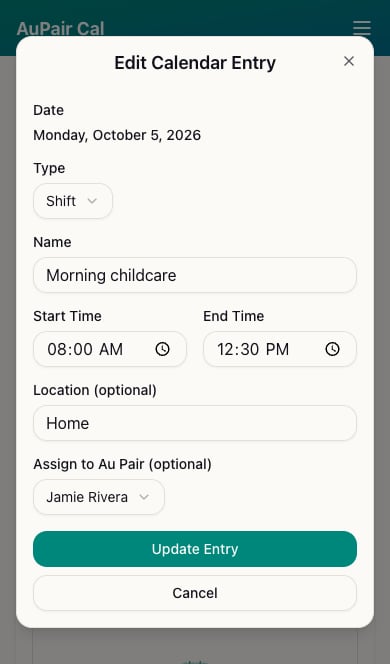
Edit Calendar Entry showing Morning childcare assigned to Jamie Rivera In our example, extending an 8am–noon shift to 12:30pm changes its duration from 4 hours to 4.5 hours.

Remove an entry

Use the entry’s trash icon (Delete entry) when you want to remove it. Check the day and entry carefully before deleting. Use Cancel in the edit dialog to leave the entry unchanged. Viewing a day from Month View takes you to its week, where you can edit the entry.